Reputation Email Examples
Explore Reputation's email marketing campaigns and get inspiration for your own campaigns.
✨ Explore New Beta Features ✨
Discover our new beta feature, Trends, which provides deeper insights into a company's email practices. Gain access to detailed analytics and trends to enhance your understanding of email strategies.View Reputation TrendsCompany Info:
Reputation (private)Company Description:
Reputation is the only platform that empowers companies to fulfill their brand promise by measuring, managing, and scaling their reputation performance in real-time, everywhere. Functioning as a business’ eyes and ears in the spaces where customers talk, post, review, and recommend, Reputation AI-powered product stack analyzes vast amounts of public and private feedback data to uncover predictive insights for companies to act on, and improve their online reputations. Visit reputation.com to learn more.Industry Tags:
Tips for Creating Emails Like Reputation
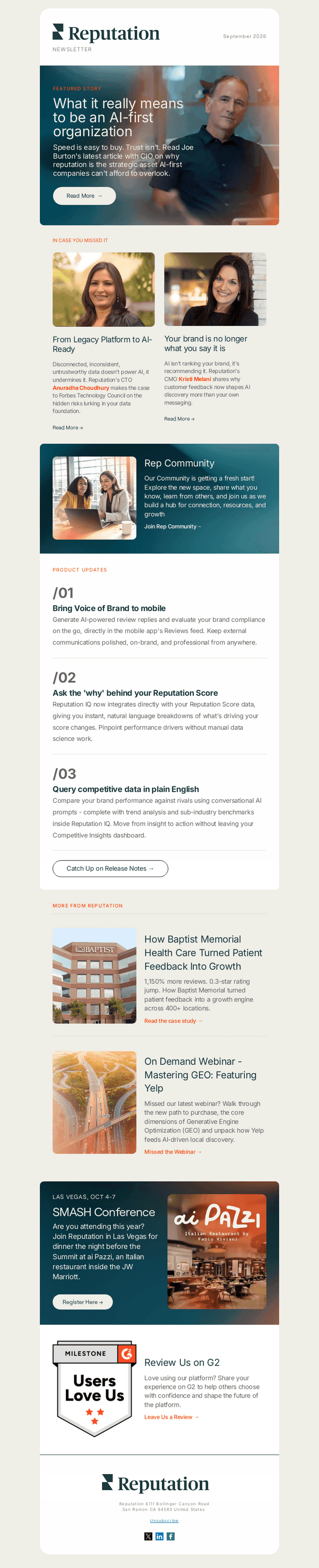
Company's Email Strategy focuses on building strong relationships with their audience by providing valuable content that engages and informs. By using personalized and relevant subject lines, Reputation ensures the emails are attention-grabbing right from the inbox. Their strategy includes a blend of promotional, educational, and community-focused content, aiming to create long-term customer engagement and loyalty. The emails often have clear calls-to-action, encouraging recipients to explore more about the company’s offerings or engage with an ongoing campaign. Consistency in frequency and messaging helps in maintaining a continuous connection with the audience.
Reputation's email style and design are sleek, professional, and aligned with their brand identity, creating a visually appealing experience for the reader. The use of high-quality images, consistent color schemes, and responsive design ensures that emails are attractive and easy to read across all devices. The layout is typically clean and uncluttered, making information easy to digest while highlighting key messages effectively.
- Use High-Quality Images: Ensure that images are clear and visually appealing to enhance the overall look of the email.
- Maintain Consistent Branding: Use consistent colors, fonts, and logos to reinforce brand identity.
- Adopt a Clean Layout: Avoid clutter by organizing content in a neat, easy-to-follow structure.
- Include Clear Calls-to-Action: Make sure CTAs are prominent and instruct the reader on the desired next steps.
- Ensure Mobile Responsiveness: Design emails that look great on all devices, especially smartphones.
- Personalize Content: Use personalized elements such as the recipient’s name or preferences to make the email feel tailored.
- Focus on Value: Offer content that provides clear benefits or insights to the reader, enhancing engagement.
- Test Before Sending: Always test emails for any formatting issues or errors before sending them out to ensure quality.